
1Weather Forecasts & Radar
OneLouder AppsWeather
4.3276.82K Reviews
- Version
- 12.11.1
- Installs
- 100.00M
- Age Rating
- Everyone
Screenshots
Our Review of 1Weather Forecasts & Radar
 Analysis by Appyee
I judge a weather app less by how impressive its forecast screen looks and more by how quickly it helps me make an ordinary decision: do I leave now, take a coat, or change my plans? 1Weather Forecasts & Radar is built for that kind of daily check-in, with forecast details, radar, alerts and home-screen widgets gathered in one place. My overall impression is that it aims to be a practical companion rather than a bare-bones temperature display, though its extra detail is most useful when you take a moment to set it up around your routine.
Quick checks and realistic speed expectations
For a fast glance before heading out, the main screen gives you a straightforward starting point instead of making you hunt through layers of menus. That matters on busy mornings: I want to see the current conditions, then decide whether it is worth opening the hourly view or radar. Widgets can make that check even more convenient because the information is available from the home screen, although a widget is best treated as a shortcut, not a substitute for looking at a changing forecast before a weather-sensitive trip.
I would not judge the app’s speed by how quickly one screen appears alone. Forecasts and radar serve different purposes: a simple glance can answer “what is it like now?”, while inspecting a weather pattern takes more attention and interaction. If you are in a hurry, check the forecast first and open radar only when the timing or movement of rain could change your plans. That small habit keeps the app useful without turning every routine check into a tour of every available panel.
When I use more than the opening screen
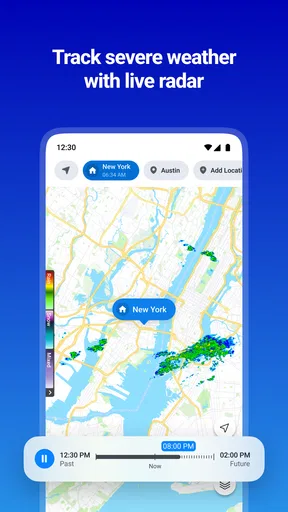
The app makes more sense when I have a reason to look beyond the current temperature. An hourly forecast is useful for deciding whether a walk or errand fits between showers; the longer outlook helps me think ahead about clothing and outdoor plans. Radar is the more hands-on part: zooming in gives a local view, while zooming out helps put a passing patch of weather in context. I find that combination more useful than a single “rain or no rain” label when the weather is unsettled.
A realistic example is a weekend plan that depends on a dry stretch. I would start with the hourly outlook to find a promising window, then use radar to check whether rain appears to be approaching the area. If it looks uncertain, I would keep the plan flexible rather than treating either screen as a guarantee. That is a sensible way to use any forecast: the app can help me make a better-informed choice, but it cannot make changing conditions certain.
There is a useful trade-off here. More forecast detail can help me compare parts of the day, but it can also tempt me to overinterpret small changes. I use the short-range view for immediate timing and the longer forecast for broad planning, not for a minute-by-minute promise. For a major trip or an activity where severe conditions would matter, I would check alerts and current radar again closer to departure instead of relying on a glance made much earlier.
Alerts, widgets and the setup that pays off
Location-specific alerts are most helpful when they reduce the need to keep checking manually. I would enable the warnings that matter to my household and leave less relevant notifications out of the way where the settings allow it. The practical question is not whether an alert exists, but whether it reaches you at a useful time without becoming background noise. If you find yourself dismissing every notification, revisit the setup rather than assuming more alerts automatically mean better preparation.
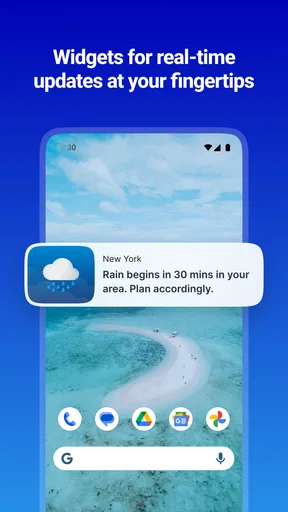
Widgets also reward a little thought. A prominent widget is convenient if weather affects your commute, outdoor work or school run; it is less valuable if you rarely look at the home screen or prefer to open an app only when needed. I would put it somewhere easy to see and use it for a quick status check, then open the full app when I need the hourly breakdown or want to inspect radar. That two-step workflow keeps the home screen useful without expecting a compact panel to answer every question.
Customization, including themes, lets you make the display feel more comfortable to use. I see that as a quality-of-life benefit rather than a reason to install the app by itself. The more meaningful setup is choosing a location, deciding which alerts deserve attention and placing a widget where it will actually be noticed. Those small choices make the difference between a weather app that becomes part of a routine and one that gets opened only when the sky already looks suspicious.
Reliability means using the right view for the question
I like that the app brings current conditions, forecasts and radar together, but I would not treat any one screen as the final word in every situation. The current snapshot is handy for deciding what to wear now; the hourly view is better for timing; radar gives a visual look at weather patterns; alerts are the part I would pay attention to when severe weather could affect plans. Each answers a different question, so cross-checking them is more useful than expecting one number or icon to cover everything.
For everyday choices, this is a comfortable approach. If I am only deciding whether to carry a light layer, a quick check is probably enough. If I am planning a long outdoor outing, I would review the forecast beforehand and check again on the day. If conditions look unsettled, I would use radar as supporting context and keep an alternative plan. That is not a flaw unique to this app; it is a sensible limit to keep in mind whenever forecasts influence decisions.
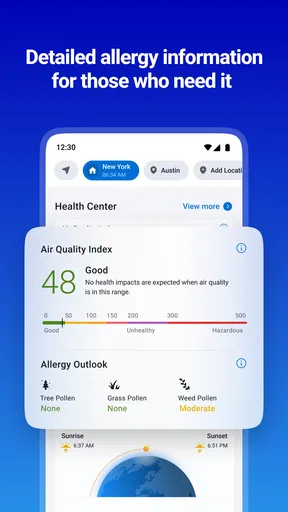
The sunrise and sunset times and moon phase information are pleasant extras, especially if you plan a walk around daylight or simply like having those details close by. They do not replace the core forecast, and I would not choose a weather app solely for them. Still, they add a little practical context without changing the basic workflow: check what is happening, see what may change, and decide what to do next.
How it compares with simpler weather apps
Compared with a minimal weather app that shows only the current conditions and a short forecast, 1Weather offers more ways to investigate what is coming: radar, alerts, widgets and additional forecast details. That breadth is a plus if you regularly plan around rain or changing conditions. The trade-off is that someone who wants only today’s temperature may find the extra choices unnecessary. If you already have a simple weather display that answers your needs at a glance, there may be little reason to switch unless radar or customizable alerts would change how you plan.
Compared with checking a forecast through a general search or a built-in phone weather screen, the app’s appeal is having several weather tools together and being able to make a widget or alert part of your routine. The better choice depends on how you use forecasts. I would lean toward this app if I want to check radar and hourly timing in the same place; I would stick with a simpler alternative if opening a dedicated weather app feels like extra work and I rarely need more than a basic outlook.
Who it suits, and where I would be cautious
This is a good fit for people who make small plans around the weather: commuters deciding when to leave, parents preparing for an outdoor school day, walkers choosing a route or anyone who wants a warning rather than discovering a sudden change by chance. It is also a reasonable pick for someone who enjoys checking radar and wants weather information visible on the home screen. The strongest case is not that every feature is essential, but that different views can support different decisions without needing separate tools.
I would recommend skipping it if you strongly prefer a stripped-down interface, never use widgets or alerts, and only check the temperature once in a while. I would also avoid treating it as a specialist forecasting instrument for high-stakes activities. For those, use the appropriate official or expert weather sources as well. The app is best understood as a convenient everyday guide, not a promise that conditions will unfold exactly as shown.
As an app from OneLouder Apps, it has been around since its release on January 11, 2012, and its current version is 11.8.3. It is free to download, with in-app purchases ranging from $0.49 to $19.99 per item. Its 4.3 average comes from around 1.1 million ratings, and it has passed 100 million installs, so it is a widely used option rather than an obscure utility. It is rated for Everyone, and the minimum operating system requirement is Android 7.0.
What to expect on your device
I would not assume that a feature-rich weather app must feel heavy, or that it will behave identically on every phone. A home-screen widget can be convenient, but adding one is still a choice: if you value a very uncluttered screen, simply skip it and open the app when needed. Likewise, using radar only when conditions call for it is a practical way to keep your routine focused. I cannot promise a particular loading time or battery impact across different devices, so I would install it, try the views you actually need and remove optional shortcuts that do not earn their place.
If the app does not show what you expect after opening, first make sure you are looking at the location you intend to check and refresh your understanding with the current forecast rather than relying on an old glance. When a plan depends on precise timing, reopen the relevant view closer to the time you will leave. These are simple habits, but they help avoid a common mistake: treating a weather screen viewed earlier as if it were a live guarantee.
First Impressions
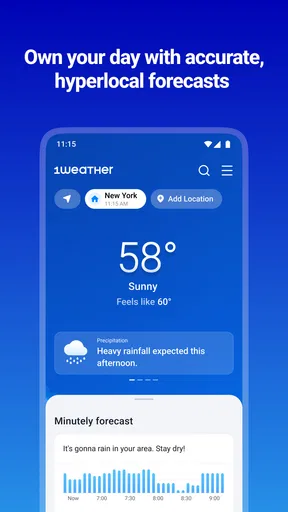
When I first launched 1Weather, the interface immediately caught my eye. It's sleek, intuitive, and doesn’t overwhelm you with unnecessary clutter. The home screen gives you a quick snapshot of the current weather, and I love how it’s all laid out neatly. You can see everything at a glance - the temperature, precipitation chances, and even a little icon showing the current conditions, whether it's sunny, cloudy, or pouring cats and dogs.
Features Galore
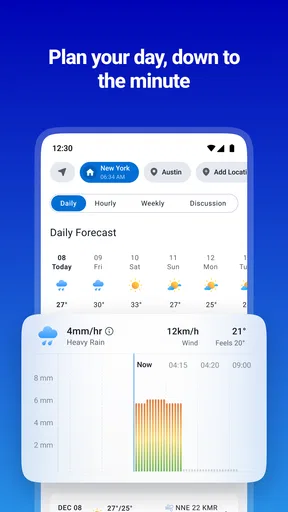
Now, let's talk about features. This app isn’t just about telling you if you need an umbrella today. It’s got hourly forecasts, which is a lifesaver when you’re planning an outdoor event or just trying to decide if a spontaneous picnic is in the cards. The seven-day forecast is super detailed, giving you high and low temps, wind speeds, and even humidity levels. Seriously, they thought of everything.
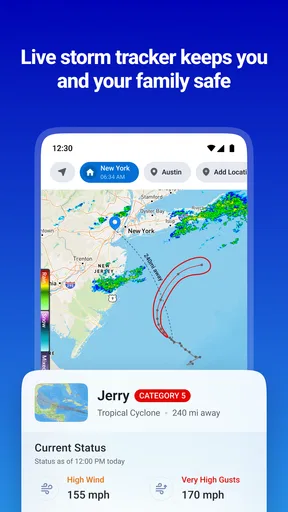
But wait, there’s more! The radar feature is where the app truly shines. It’s interactive and lets you zoom in and out to see real-time weather patterns. Whether there’s a storm brewing or just a light drizzle, you can keep tabs on it all with just a few taps. It's like having a mini meteorologist right in your pocket.
Customization and Alerts
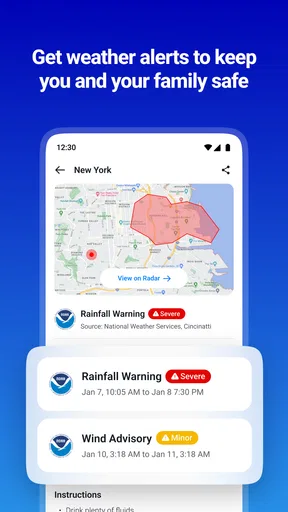
One of my favorite aspects is the customization. You can set up weather alerts for your specific location, so you’re always in the know. Whether it's severe weather warnings or just a nudge about a temperature drop, you’ll get a heads-up. Plus, you can choose from a variety of themes to match your vibe. How cool is that?
Why I Keep Coming Back
Sure, there are tons of weather apps out there, but what makes this one a keeper? For me, it’s the combination of accuracy and ease of use. The developers clearly put a lot of thought into the user experience, and it shows. Everything you need is right there at your fingertips, and you don’t have to dig through endless menus to find it.
And let's not forget the little extras like the sunrise and sunset times, and even a nifty moon phase tracker. These might seem like small details, but they add a nice touch that makes the app feel complete.
Final Thoughts
If you’re searching for a reliable and feature-packed weather app, give 1Weather Forecasts & Radar a try. It’s got everything you need to stay informed and prepared for whatever Mother Nature throws your way. Plus, it’s free to download, so what have you got to lose? Trust me, once you try it, you’ll wonder how you ever managed without it.
So, what are you waiting for? Check it out and let me know if it becomes your new weather sidekick too!
Privacy and Permissions
See what permissions an app requests and how it handles your data.
- Location
- approximate location (network-based), precise location (GPS and network-based)
- Phone
- read phone status and identity
- Camera
- take pictures and videos
- Microphone
- record audio
- Wi-Fi connection information
- view Wi-Fi connections
- Device ID & call information
- read phone status and identity
- Other
- view network connections, full network access, run at startup, prevent device from sleeping
Verdict
Strengths of 1Weather Forecasts & Radar
- User-friendly interface for easy navigation.
- Accurate and up-to-date weather data.
- Customizable alerts for severe weather.
- Supports multiple locations tracking.
- Beautiful weather animations enhance experience.
Limitations of 1Weather Forecasts & Radar
- Contains ads that can be intrusive.
- Premium features require a subscription.
- Some features need internet connection.
- Occasional lag on older devices.
- Limited widget customization options.
Other Releases by OneLouder Apps
View All
Weather
Weather4.6
Similar Picks in This Category
View All
Weather - By Xiaomi
Xiaomi Inc.4.1

Weather & Radar Forecast
WetterOnline4.8
Weather
OneLouder Apps4.6

AccuWeather: Weather Radar
AccuWeather3.6

The Weather Channel - Radar
The Weather Channel4.6

Transparent clock and weather
MACHAPP Software Ltd4.2
You May Also Like
View All

Frequently Asked Questions
What features does 1Weather Forecasts & Radar offer?
1Weather provides comprehensive weather updates, including real-time radar, weather forecasts, and severe weather alerts. It offers detailed information on temperature, precipitation, wind speed, and humidity. Users can also access sunrise and sunset times, moon phases, and a 10-day extended forecast. Customizable widgets and interactive radar maps enhance user experience.
Is 1Weather Forecasts & Radar free to use?
1Weather offers a free version with basic features, supported by ads. For an ad-free experience and additional features like advanced radar layers, users can upgrade to the premium version. The subscription model provides an enhanced experience and is recommended for frequent users who prefer uninterrupted access to all features.
How accurate are the weather forecasts on 1Weather?
1Weather sources its data from reliable meteorological agencies, ensuring high accuracy. The app updates frequently with real-time radar and localized forecasts. While no weather app can guarantee absolute precision, users generally find 1Weather's predictions to be trustworthy and consistent, making it a popular choice for weather updates.
Can I customize notifications in 1Weather?
Yes, 1Weather allows users to set up personalized notifications for various weather conditions. Users can receive alerts for severe weather, daily forecasts, and temperature changes. The app provides flexibility in notification settings, enabling users to tailor alerts based on their preferences and location-specific needs.
Is it possible to track weather for multiple locations in 1Weather?
Absolutely, 1Weather supports tracking weather for multiple locations. Users can easily add and switch between different cities or regions to monitor weather conditions worldwide. This feature is particularly useful for travelers or those who want to keep tabs on weather conditions affecting family and friends in different areas.
